Velmi1337
Linux · x86_64

ALOL: Arizona RP on Linux.

Manage the Windows game environment from a native Linux launcher: choose servers, keep nicknames per server, configure mods and repair common environment problems.

For Linux x86_64. Game files and Windows components are not bundled. You need the official Arizona installer, an appropriate Wine/Proton environment and suitable graphics drivers.

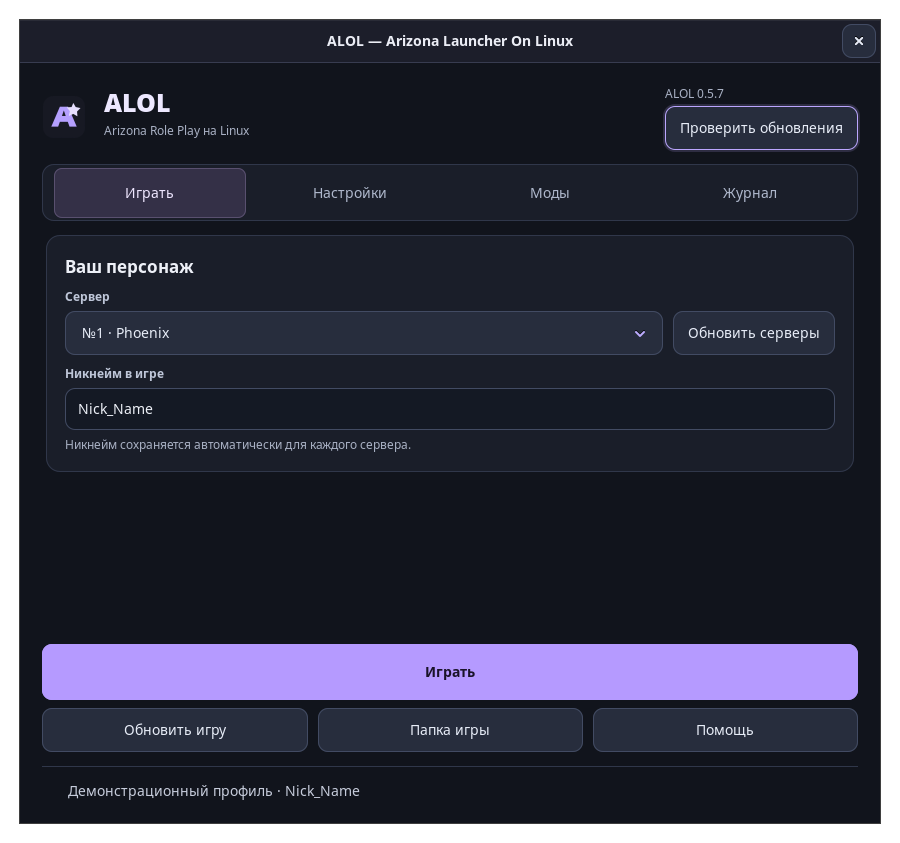
ALOL native Linux launcher with server selection, player nickname, game launch and settings
Getting started

Get a game environment ready.

  1. Download the appropriate package from the latest GitHub release: Arch/CachyOS package, Fedora RPM, or the documented alternative.
  2. Install the package using the guide. Arch-based setups need multilib and appropriate 32/64-bit graphics drivers. Fedora packages document their Wine/winetricks requirements.
  3. Download the installer from the official Arizona site and select the .exe in ALOL. Let the official launcher download or update game files.
  4. Close the official launcher, choose your server and nickname, then launch through ALOL.
Read the documentation

What the launcher manages.

Servers and profiles

Choose a server and keep a separate nickname for each server.

Wine and Proton

Configure the game environment; consult the compatibility guide for the runtime and driver requirements.

Mods and options

Use the documented mod tools, custom files and game graphics/memory settings.

Repair and updates

Repair common text/font/environment issues with backups and manage launcher updates.

Read the requirements first.

Published packages target Linux x86_64, with instructions for Arch/CachyOS and Fedora 44+. Runtime and graphics compatibility vary. The launcher is independent of Arizona Games and does not include the game.

Current development sources are Apache-2.0. Earlier published tags and archives, including 0.5.7, retain their stated MIT license. Check the license shipped with the version you redistribute.

The screenshot uses the project’s demonstration profile. It shows the interface, not a claim of a verified live game session.

Project news: @alolinux on Telegram.

Have a specific question or bug?

Read the setup guide first, then describe what you tried and what happened. Useful reports help improve the project.

Appearance

Theme
Accent color

Make this space yours. Your choices stay in this browser.